nginx_upstream_check_module 模块的作用主要是为 Nginx 的 upstream(上游服务器) 提供主动健康检查 和一些负载均衡增强功能。
1、具体来说,它的功能和作用如下:
主动健康检查(Active Health Check)
默认 Nginx 的 upstream 只能被动发现后端宕机(通过连接失败或响应超时)。
安装了 nginx_upstream_check_module 后,可以:
定期向后端服务器发送 HTTP 请求或 TCP 探针。
判断后端服务器是否可用。
动将不可用的服务器标记为 down,从负载均衡池中剔除。
2、支持多种类型:
type=http → 用于 HTTP 服务。
type=https → 用于 HTTPS 服务。
type=tcp → 用于 TCP 服务(非 HTTP)。
interval:检查间隔,例如 `interval=5000` 表示每 5 秒检查一次。
rise:连续成功多少次后,判定节点恢复正常。
fall:连续失败多少次后,判定节点不可用。
timeout:检查请求超时时间(毫秒)。
3、可自定义 HTTP 请求报文。
判断响应状态码是否正常,例如 2xx 或 3xx。
4、设置可用更新源
wget -O /etc/yum.repos.d/epel.repo https://mirrors.aliyun.com/repo/epel-7.repo
wget -4 --no-check-certificate -O /etc/yum.repos.d/CentOS-Base.repo https://www.zhangfangzhou.cn/third/Centos-7.repo
5、下载源码
### Nginx 源码
wget https://nginx.org/download/nginx-1.20.2.tar.gz
tar -zxvf nginx-1.20.2.tar.gz

### zlib(可选,用于数据压缩)
wget http://www.zlib.net/zlib-1.2.13.tar.gz
tar -zxf zlib-1.2.13.tar.gz

### PCRE(支持正则表达式匹配)
wget --no-check-certificate https://ftp.pcre.org/pub/pcre/pcre-8.45.tar.gz
tar -zxf pcre-8.45.tar.gz

### OpenSSL(支持 HTTPS)
wget https://www.openssl.org/source/openssl-1.1.1t.tar.gz
tar -zxf openssl-1.1.1t.tar.gz
mv openssl-1.1.1t openssl

### Sticky 模块
wget https://bitbucket.org/nginx-goodies/nginx-sticky-module-ng/get/08a395c66e42.zip -O sticky.zip
unzip sticky.zip
mv nginx-goodies-nginx-sticky* nginx-sticky

### nginx_upstream_check_module
wget https://github.com/yaoweibin/nginx_upstream_check_module/archive/master.zip -O nginx_upstream_check_module-master.zip
unzip nginx_upstream_check_module-master.zip
6、编译安装
yum -y install libtool
#zlib 是提供数据压缩之用的库 (非必要编译安装)
cd ~
cd zlib-1.2.13
./configure --prefix=/usr/local/zlib
make && make install
echo "/usr/local/zlib/lib" > /etc/ld.so.conf.d/zlib.conf
ldconfig

#pcre PCRE库是一组函数,它们使用与Perl 5相同的语法和语义实现正则表达式模式匹配.(非必要编译安装)
cd ~
sudo yum install gcc-c++ -y
tar -zxf pcre-8.45.tar.gz
cd pcre-8.45
./configure --prefix=/usr/local/pcre --enable-utf8
make && make install
~/pcre-8.45/libtool --finish  /usr/local/pcre/lib/
echo "/usr/local/pcre/lib/" > /etc/ld.so.conf.d/pcre.conf
ldconfig

## 安装 Patch 工具(为 nginx_upstream_check_module 打补丁)
yum install -y patch

ngstable=1.20.2
#Install Nginx
cd ~
yum -y install gzip man
tar -zxf nginx-${ngstable}.tar.gz
#
#Custom nginx name
sed -i 's@^#define NGINX_VER          "nginx/" NGINX_VERSION@#define NGINX_VER          "Microsoft-IIS/10.0/" NGINX_VERSION@g'  ~/nginx-${ngstable}/src/core/nginx.h
sed -i 's@^#define NGINX_VAR          "NGINX"@#define NGINX_VAR          "Microsoft-IIS"@g'  ~/nginx-${ngstable}/src/core/nginx.h
sed -i '30,40s@nginx@Microsoft-IIS@g'  ~/nginx-${ngstable}/src/http/ngx_http_special_response.c
sed -i '45,50s@nginx@Microsoft-IIS@g' ~/nginx-${ngstable}/src/http/ngx_http_header_filter_module.c
#
#Nginx shows the file name length of a static directory file
sed -i 's/^#define NGX_HTTP_AUTOINDEX_PREALLOCATE  50/#define NGX_HTTP_AUTOINDEX_PREALLOCATE  150/'  ~/nginx-${ngstable}/src/http/modules/ngx_http_autoindex_module.c
sed -i 's/^#define NGX_HTTP_AUTOINDEX_NAME_LEN     50/#define NGX_HTTP_AUTOINDEX_NAME_LEN     150/'  ~/nginx-${ngstable}/src/http/modules/ngx_http_autoindex_module.c
#
yum install -y patch
cd ~/nginx-${ngstable}
patch -p1 < ../nginx_upstream_check_module-master/check_1.20.1+.patch
# patch -p1 < ../nginx_upstream_check_module-master/check_1.20.1+.patch
patching file src/http/modules/ngx_http_upstream_hash_module.c
patching file src/http/modules/ngx_http_upstream_ip_hash_module.c
patching file src/http/modules/ngx_http_upstream_least_conn_module.c
patching file src/http/ngx_http_upstream_round_robin.c
patching file src/http/ngx_http_upstream_round_robin.h

#Copy NGINX manual page to /usr/share/man/man8:
cp -f ~/nginx-${ngstable}/man/nginx.8 /usr/share/man/man8
gzip /usr/share/man/man8/nginx.8

cd ~/nginx-${ngstable}
./configure --prefix=/usr/local/nginx --user=www --group=www \
--build=CentOS \
--modules-path=/usr/local/nginx/modules \
--with-openssl=/root/openssl \
--with-pcre=/root/pcre-8.45 \
--with-zlib=/root/zlib-1.2.13 \
--add-module=/root/nginx-sticky \
--add-module=/root/nginx_upstream_check_module-master \
--with-http_stub_status_module \
--with-http_secure_link_module \
--with-threads \
--with-file-aio \
--with-http_v2_module \
--with-http_ssl_module \
--with-http_gzip_static_module \
--with-http_gunzip_module \
--with-http_realip_module \
--with-http_flv_module \
--with-http_mp4_module \
--with-http_sub_module \
--with-http_dav_module \
--with-stream \
--with-stream=dynamic \
--with-stream_ssl_module \
--with-stream_realip_module \
--with-stream_ssl_preread_module
make -j$(nproc)
make install
7、平滑升级nginx
mv /usr/local/nginx/sbin/nginx /usr/local/nginx/sbin/nginx.old

#然后拷贝一份新编译的二进制文件:
cp ~/nginx-${ngstable}/objs/nginx /usr/local/nginx/sbin/

#检测配置
nginx -t
kill -USR2 `cat /var/run/nginx.pid`
kill -HUP `cat /var/run/nginx.pid`
8、修改配置
upstream oah {
sticky; # 会话保持
server 10.53.121.51:8080;
server 10.53.121.52:8080;
server 10.53.121.53:8080;
server 10.53.121.66:8080;
server 10.53.121.67:8080;
# TCP 健康检查,只检测端口是否可用
check interval=5000 rise=2 fall=3 timeout=3000 type=tcp;
}
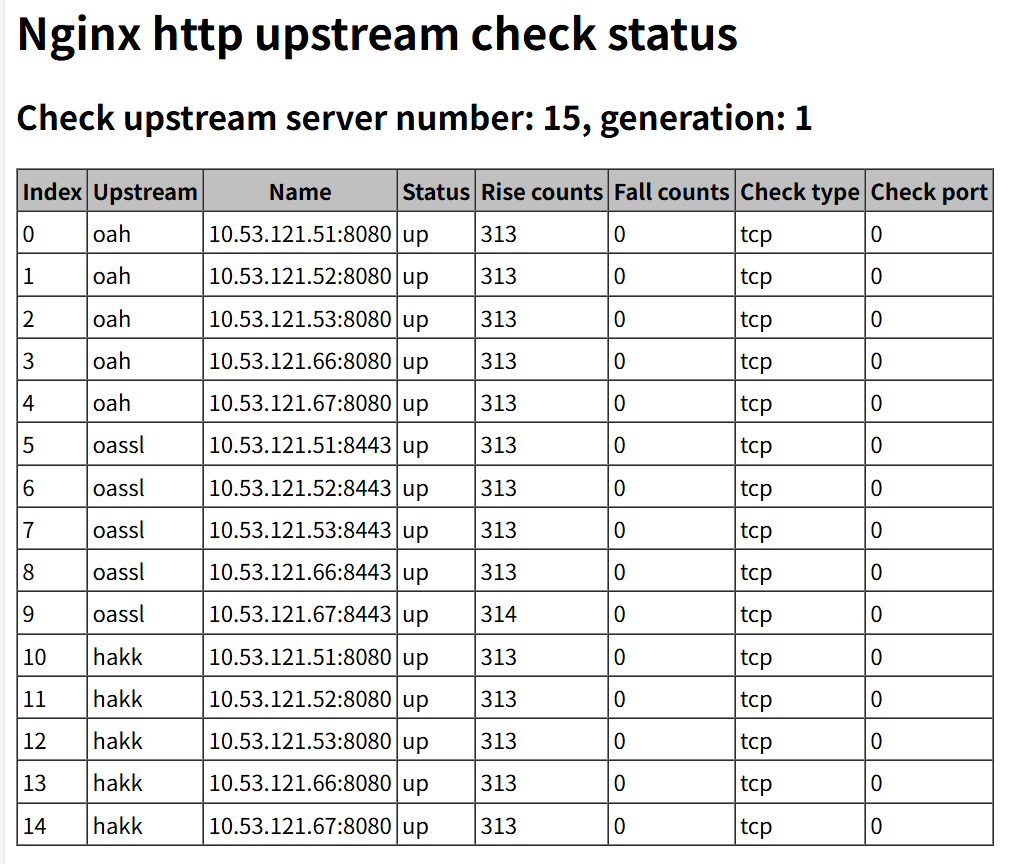
9、添加status页面
location /status {
check_status;
}
10、创建网站和日志文件夹
mkdir -p /home/{wwwlogs,wwwroot}
11、#设置文件夹权限
chown www.www -R /usr/local/nginx;
chown www.www -R /home/{wwwlogs,wwwroot};
12、#修改配置文件
vi /usr/local/nginx/conf/nginx.conf

user www www;
worker_processes auto;
worker_cpu_affinity auto;

error_log /home/wwwlogs/error_nginx.log warn;#debug | info | notice | warn | error | crit ]
pid /var/run/nginx.pid;
worker_rlimit_nofile 51200;

events {
    use epoll;
    worker_connections 51200;
    multi_accept on;
    }

http {
log_format realip '$realip_remote_addr - $remote_user $time_local '
               '"$request" $status $body_bytes_sent "$http_referer" "$http_user_agent" ' ;
    include mime.types;
    default_type application/octet-stream;
    server_names_hash_bucket_size 128;
    client_header_buffer_size 32k;
    large_client_header_buffers 4 32k;
    client_max_body_size 1024m;
    client_body_buffer_size 10m;
    sendfile on;
    tcp_nopush on;
    keepalive_timeout 300;
    server_tokens off;
    tcp_nodelay on;

    fastcgi_connect_timeout 300;
    fastcgi_send_timeout 300;
    fastcgi_read_timeout 300;
    fastcgi_buffer_size 64k;
    fastcgi_buffers 4 64k;
    fastcgi_busy_buffers_size 128k;
    fastcgi_temp_file_write_size 128k;

    #Gzip Compression
    gzip on;
    gzip_buffers 16 8k;
    gzip_comp_level 6;
    gzip_http_version 1.1;
    gzip_min_length 256;
    gzip_proxied any;
    gzip_vary on;
    gzip_types
    text/xml application/xml application/atom+xml application/rss+xml application/xhtml+xml image/svg+xml
    text/javascript application/javascript application/x-javascript
    text/x-json application/json application/x-web-app-manifest+json
    text/css text/plain text/x-component
    font/opentype application/x-font-ttf application/vnd.ms-fontobject
    image/x-icon;
    gzip_disable "MSIE [1-6]\.(?!.*SV1)";

    #If you have a lot of static files to serve through Nginx then caching of the files' metadata (not the actual files' contents) can save some latency.
    open_file_cache max=1000 inactive=20s;
    open_file_cache_valid 30s;
    open_file_cache_min_uses 5;
    open_file_cache_errors on;

######################## default ############################
upstream zhangfangzhou {
    sticky;  # 会话保持
    server 10.53.121.51:8080;
    server 10.53.121.52:8080;
    server 10.53.121.53:8080;
    server 10.53.121.66:8080;
    server 10.53.121.67:8080;
    # TCP 健康检查,只检测端口是否可用
    check interval=5000 rise=2 fall=3 timeout=3000 type=tcp;
}

   server {
    listen 80 default_server;
    server_name _;
    return 444;
          }

server {
    access_log /home/wwwlogs/access_nginx.log realip;
if ($http_user_agent ~* (ApacheBench|webbench|Scrapy)) {
     return 444;
}

#if ($http_user_agent ~ "FeedDemon|Indy Library|WinHttp|Alexa Toolbar|AskTbFXTV|AhrefsBot|Python-urllib|Jullo|Feedly|jaunty|ZmEu|CrawlDaddy|Microsoft URL Control|^$" ) {
#     return 444;
#}

if ($request_uri ~* (.*)\.(bak|mdb|db|sql)$){
          return 444;
}

if ($request_method !~ ^(GET|HEAD|POST)$) {
    return 403;
}

    listen 80;
    server_name kms.cregcloud.com;
    location / {
    proxy_pass http://zhangfangzhou ;
    proxy_set_header X-Real-IP $remote_addr;
    proxy_set_header X-Forwarded-For $proxy_add_x_forwarded_for;
    proxy_connect_timeout 60;
    proxy_read_timeout 600;
    proxy_send_timeout 600;
    proxy_set_header Accept-Encoding "";
    proxy_set_header User-Agent $http_user_agent;
    proxy_set_header host $host;
    proxy_buffering on;
    proxy_buffer_size 512k;
    proxy_buffers 256 512k;
    proxy_busy_buffers_size 1024k;
		}
    location /nginx_status {
        stub_status on;
        access_log off;
        allow 127.0.0.1;
        allow 10.53.0.0/16;
        deny all;
                           }

    include vhost/*.conf;
	}
}
13、设置启动服务
##################set systemctl nginx.service
cat > /usr/lib/systemd/system/nginx.service << EOF
[Unit]
Description=nginx - high performance web server
Documentation=http://nginx.org/en/docs/
After=network-online.target remote-fs.target nss-lookup.target
Wants=network-online.target

[Service]
Type=forking
PIDFile=/var/run/nginx.pid
ExecStartPost=/bin/sleep 0.1
ExecStartPre=/usr/local/nginx/sbin/nginx -t -c /usr/local/nginx/conf/nginx.conf
ExecStart=/usr/local/nginx/sbin/nginx -c /usr/local/nginx/conf/nginx.conf
ExecReload=/usr/local/nginx/sbin/nginx -s reload
ExecStop=/usr/local/nginx/sbin/nginx -s stop
PrivateTmp=true
LimitNOFILE=51200
LimitNPROC=51200
LimitCORE=51200

[Install]
WantedBy=multi-user.target
EOF

chmod +x /usr/lib/systemd/system/nginx.service
systemctl enable nginx.service
systemctl start nginx.service