本地部署 AI绘图作画工具 stable-diffusion-webui(含多种模型和国内加速)
Stable-Diffusion-WebUI是一个基于Gradio库的浏览器界面,用于可视化展示和交互式探索Stable Diffusion模型的结果。
GPU显存大小:GPU显存大小限制了模型可以处理的数据量。较大的显存可以容纳更多的图像信息和模型参数,因此可以支持生成更大尺寸的图片。当生成大尺寸图片时,需要更多的显存来存储中间结果和生成的图像,较小的显存可能会限制生成高分辨率或复杂场景的能力。
GPU主频:GPU主频指的是GPU的工作频率,即每秒处理的指令数。较高的主频能够提供更快的计算速度,从而加快AI生成图片的过程。当需要迅速生成图片时,高主频的GPU可以有效缩短生成时间,提高效率。
显存位宽:显存位宽表示显存每次传输数据的宽度,通常以位为单位。较大的位宽意味着GPU可以更快地读取和写入显存数据。在生成图片过程中,大的位宽可以提高数据传输速度,从而加快模型的训练和推理速度。
部署环境
CPU:Intel(R) Xeon(R) Gold 6246 CPU @ 3.30GHz 3.30 GHz
GPU:NVIDIA GRID V100S-32Q(vGPU)
内存:64GB
磁盘:1TB
OS: Microsoft Windows 10 企业版
部署步骤
1、#安装基础环境
基础环境由Python 3.10.6(安装 Python 3.10.6 与 pip,一定安装3.10.6版本的Python),Git ,CUDA 组成
1.1、#安装Python
访问 Python3.10.6 下载页面 https://www.python.org/downloads/release/python-3106/
找到【Windows installer (64-bit)】点击下载,安装的时候需要勾选 Add Python to PATH。
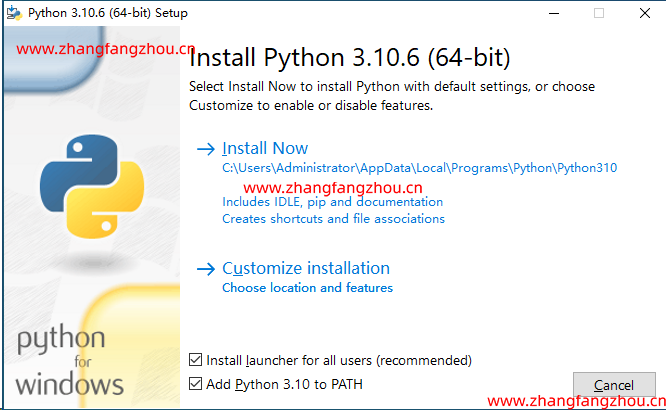
安装完成后
命令行里输入Python --version,如果返回Python 3.10.6那就是安装成功。
命令行里输入 python -m pip install --upgrade pip安装升级pip到最新版。
1.2、#安装 Git https://git-scm.com/download
访问 Git 下载页面
点击【Download for Windows】,【64-bit Git for Windows Setup】点击下载
命令行运行git --version

1.3、#安装 CUDA (NVIDIA显卡用户)
命令行运行nvidia-smi,看下自己显卡支持的 CUDA版本
C:\Users\Administrator>cd C:\Program Files\NVIDIA Corporation\NVSMI

C:\Program Files\NVIDIA Corporation\NVSMI>nvidia-smi.exe
Thu Aug 17 15:06:21 2023
+-----------------------------------------------------------------------------+
| NVIDIA-SMI 474.14       Driver Version: 474.14       CUDA Version: 11.4     |
|-------------------------------+----------------------+----------------------+
| GPU  Name            TCC/WDDM | Bus-Id        Disp.A | Volatile Uncorr. ECC |
| Fan  Temp  Perf  Pwr:Usage/Cap|         Memory-Usage | GPU-Util  Compute M. |
|                               |                      |               MIG M. |
|===============================+======================+======================|
|   0  GRID V100S-32Q     WDDM  | 00000000:02:01.0  On |                    0 |
| N/A    0C    P0    N/A /  N/A |   6305MiB / 32768MiB |      0%      Default |
|                               |                      |                  N/A |
+-------------------------------+----------------------+----------------------+

+-----------------------------------------------------------------------------+
| Processes:                                                                  |
|  GPU   GI   CI        PID   Type   Process name                  GPU Memory |
|        ID   ID                                                   Usage      |
|=============================================================================|
|    0   N/A  N/A      1520    C+G   Insufficient Permissions        N/A      |
|    0   N/A  N/A      1540    C+G   Insufficient Permissions        N/A      |
|    0   N/A  N/A      1548    C+G   Insufficient Permissions        N/A      |
|    0   N/A  N/A      2468      C   ...thon\Python310\python.exe    N/A      |

接下来前往英伟达官网,下载对应版本https://developer.nvidia.com/cuda-toolkit-archive
选你自己的操作系统版本,注意下离线安装包【exe [local]】,在线安装的话,速度还是比较慢。
1.4、#为什么NVIDIA显卡安装驱动后,还要安装CUDA驱动
NVIDIA显卡驱动和CUDA是两个不同的软件组件,它们在GPU的功能和应用上发挥不同的作用。
NVIDIA显卡驱动:NVIDIA显卡驱动是操作系统与显卡之间的桥梁,它负责管理和控制显卡的硬件功能,确保显卡能够正常工作并与操作系统进行通信。
安装显卡驱动是使用NVIDIA显卡的基本要求,它提供了对显卡的支持和兼容性。
CUDA(Compute Unified Device Architecture):CUDA是NVIDIA开发的并行计算平台和编程模型,它允许开发者使用显卡的并行计算能力进行高性能计算和加速。
CUDA提供了一组API和工具,使开发者能够在显卡上编写并行计算的程序,并利用GPU的大规模并行计算能力加速各种计算任务,包括机器学习、深度学习、科学计算等。
2、#下载项目源代码
git clone https://github.com/AUTOMATIC1111/stable-diffusion-webui.git
D:\>git clone https://github.com/AUTOMATIC1111/stable-diffusion-webui.git
Cloning into 'stable-diffusion-webui'...
remote: Enumerating objects: 25982, done.
remote: Counting objects: 100% (369/369), done.
remote: Compressing objects: 100% (160/160), done.
remote: Total 25982 (delta 237), reused 323 (delta 205), pack-reused 25613
Receiving objects: 100% (25982/25982), 31.77 MiB | 12.31 MiB/s, done.
Resolving deltas: 100% (18197/18197), done.
# 切换到项目根目录
cd stable-diffusion-webui
3、#下载模型文件
stable-diffusion-webui只是个工具,需要后端的训练模型来让AI参考建模。
目前比较主流的模型有
Stable-Diffusion (SD) 模型:Stable-Diffusion 是一个基于扩散模型的图像生成模型,主要用于生成偏向真实人物的图像。它采用了稳定扩散过程的方法,通过迭代多次来逐步生成图像,并且具有较好的生成稳定性和细节保留能力。SD 模型通常用于生成逼真的人脸图像或人物形象。
Waifu-Diffusion (WD) 模型:Waifu-Diffusion 是一个专注于生成二次元角色(常称为"waifu")图像的模型。它基于扩散模型的思想,通过迭代生成过程逐渐生成具有艺术风格的二次元角色图像。WD 模型通常用于创作二次元角色形象、插画或动漫风格的图像。
Novel-AI-Leaks (Naifu) 模型:Novel-AI-Leaks 是一个更偏向于二次元角色的图像生成模型。它在生成图像时,更加注重创造出富有想象力和创意的二次元角色形象。Naifu 模型通常用于艺术创作、插画制作和二次元角色设计等领域。
4、#运行
双击运行\stable-diffusion-webui\webui-user.bat
脚本会自己检查依赖,会下载大约几个GB的东西,解压安装到文件夹内(中间可能会失败,失败后需要再次运行webui-user.bat)。


venv "D:\stable-diffusion-webui\venv\Scripts\Python.exe"
Python 3.10.6 (tags/v3.10.6:9c7b4bd, Aug 1 2022, 21:53:49) [MSC v.1932 64 bit (AMD64)]
Version: v1.5.1
Commit hash: 68f336bd994bed5442ad95bad6b6ad5564a5409a
Installing gfpgan
当遇到卡在installing gfpgan时候需要切换成阿里的源
C:\Users\Administrator>pip config set global.index-url https://mirrors.aliyun.com/pypi/simple
Writing to C:\Users\Administrator\AppData\Roaming\pip\pip.ini
5、#复制到浏览器访问
(默认是 http://127.0.0.1:7860 )(注意不要关闭这个窗口,关闭就退出了)
6、#生成第一张AI作图

1、Prompt(提示):在Prompt中填写你想要的特征点,可以作为生成图片的指导。通过提供具体的描述或指令,可以引导AI生成符合你期望的图像。
2、Negative prompt(负面提示):在Negative prompt中填写你不想要的特征点,可以告诉AI避免生成这些特征。负面提示可以帮助你更精确地控制生成图片的内容。
3、Sampling Steps(采样步数):指定AI推演的步数,控制生成图片的细节和精度。较高的步数可以产生更多的细节,但会增加生成时间。一般在20到30之间选择较为合适。
4、Sampling method(采样方法):选择AI推演的算法,常见的有Euler a、Euler和DDIM等。不同的采样方法可能会影响到生成图片的效果和风格。
5、图片分辨率:指定生成图片的分辨率,较高的分辨率可以获得更清晰、更多细节的图像。但需要注意显存的限制,确保分辨率不超过显存能够处理的范围。
扩展选项:
Restore faces(修复人脸):勾选后可以生成更真实的脸部特征。需要下载额外的运行库,并且第一次使用时会占用一定的存储空间。
D:\stable-diffusion-webui\models\Codeformer\codeformer-v0.1.0.pth
D:\stable-diffusion-webui\repositories\CodeFormer\weights\facelib\detection_Resnet50_Final.pth
D:\stable-diffusion-webui\repositories\CodeFormer\weights\facelib\ parsing_parsenet.pth
Tiling(平铺):让生成的图像可以无缝地平铺,类似瓷砖的效果,使图案可以自动衔接。
Highres. fix(超分辨率修复):使用更高的分辨率填充内容,但最终生成的图像仍然是设定的分辨率。
Batch count(批次数):指定一次运行生成图片的次数。
Batch size(批次大小):指定同时生成图片的数量。
CFG Scale(CFG比例):控制AI生成图片时参考你的Prompt和Negative prompt的程度。较高的值会更严格地按照你的设定进行生成,而较低的值则更加自由和创意。
Seed(随机数种子):用于初始化AI生成图片的起始噪声,不同的种子会产生不同的生成结果。
Generate(生成):点击该按钮开始运行AI生成图片的过程。
Stable Diffusion checkpoint(稳定扩散检查点):选择使用的模型,根据你的需求和体验自行选择。
Script X/Y/Z plot
1、使用多种绘画方式
Y type 选择Sampler,然后在Y values 可以全部选择Sampling method,经测试这几种方式效果较好
Euler a
DPM++2S a
DPM++2M
DPM2 a Karras
DPM2++ 2S a Karras
DPM2++ 2M a Karras
2、测试lora权重对绘画的影响
在txt2img填写
7、模型下载
majicMIX realistic 麦橘写实 https://www.liblibai.com/modelinfo/bced6d7ec1460ac7b923fc5bc95c4540
采样器建议: Euler
如果要修复脸部,请使用after detailer.
Pure Beauty https://www.liblibai.com/modelinfo/13bcec1633cd440c9ae986787b733b10
CFG Scale:7
迭代步数:15-120
VAE: 840000
采样器建议: DPM++ 2M SDE Karras
绘制人物图像时请配合启用ADetailer 插件,推荐使用模型:face_yolov8n.pt和face_yolov8s.pt
生成专业摄影图像时,建议在正向提示词中除了Bean_Lab, Pure Beauty, 1 girl, best quality等触发词外,可加入以下词汇:Studio lighting, Canon EOS-1D X Mark II, 70mm ,f2.8,ISO 200,(其中除了工作室灯光外,方位灯光也可以根据需要来选择使用,例如:顺光、前侧光、侧光、顶光、侧逆光等等,相机型号有多种选择,除了上述提到的,还有Canon EOS R5、Canon 1Dx3、SONY A7R III、Nikon D6、 Fujifilm GFX 100S、Fujifilm 50S II等等高清相机型号可选择, 另外推荐使用大光圈F1.4,F2.0,F2.8,人像焦距24-70mm, 感光度:100-200之间),当然,上述仅供参考,这些数据都可根据最终想要呈现的效果来调试
Negative Promts / 负面提示词:ng_deepnegative_v1_75t,EasyNegative
8、提示词下载
a、https://github.com/thisjam/sd-webui-oldsix-prompt
点击页面上的code->DownloadZip 解压以后放在你的sd文件夹下的extensions文件夹后应用并重启
11、在页面上显示 VAE 设置
stable-diffusion-webui 默认页面并没有显示 VAE 设置部分,所以需要先设置一下。首先点击「Settings」,然后点左侧菜单的「User interface」这个 Tab,
拉到下面有个选项叫做Quicksettings list,在输入框里面添加,sd_vae,CLIP_stop_at_last_layers,最后点击上面的「Apply settings」,在点「Reload UI」就会重新刷新页面。
Clip skip选项,默认是 1,需要改成常用的 2,可以简单的理解这个值越高,AI 就会省略越多的分类细项。
下载 VAE 模型(效果不理想)
https://huggingface.co/stabilityai/sd-vae-ft-mse-original/tree/main
12、ADetailer 插件
1、https://github.com/Bing-su/adetailer
2、解压上传到文件夹D:\stable-diffusion-webui\extensions
3、重启Web-UI
4、固定Seed
5、启用ADetailer
Enable ADetailer #启用
1st #第一个ADetailer model模型
mediapipe_face_mesh
2nd #第二个ADetailer model模型
模型说明
Model Target
face_yolov8n.pt 2D / realistic face
face_yolov8s.pt 2D / realistic face
hand_yolov8n.pt 2D / realistic hand
person_yolov8n-seg.pt 2D / realistic person
person_yolov8s-seg.pt 2D / realistic person
mediapipe_face_full realistic face
mediapipe_face_short realistic face
mediapipe_face_mesh realistic face


 "进程每打开一个文件(linux下一切皆文件,包括socket),都会消耗一定的内存资源。如果有不怀好心的人启动一个进程来无限的创建和打开新的文件,会让服务器崩溃。所以linux系统出于安全角度的考虑,在多个位置都限制了可打开的文件描述符的数量,包括系统级、用户级、进程级。这三个限制的含义和修改方式如下:"
 "TCP分配发送缓存区的大小受参数net.ipv4.tcp_wmem配置影响。"


 # embedded_vCSA_on_ESXi.json ESXi 7 未加入vCenter集群


