Ignore、Ignore all、Re-initialize、Re-initialize all

Ignore、Ignore all、Re-initialize、Re-initialize all
Windows Server2012 添加.NET Framework 3.5
Windows Server2012 R2添加.NET Framework 3.5


cPanel配置ssh并使用putty管理主机

NGINX 配置404错误页面

1、创建自己的404.html页面

2、编辑nginx.conf在http定义区域加入:fastcgi_intercept_errors on;

3、编辑nginx.conf或虚拟主机的域名.conf在server 区域加入:

error_page 404 /404.html;

4、测试nginx.conf正确性:

#/usr/local/nginx/sbin/nginx -t

the configuration file /opt/nginx/conf/nginx.conf syntax is ok
configuration file /opt/nginx/conf/nginx.conf test is successful

5、重启nginx生效

#/usr/local/nginx/sbin/nginx -s reload

6、502 等错误可以用同样的方法来配置。

error_page  500 502 503 504  /50x.html;


如果远程桌面使用不正确的方法退出的话,下次再远程时,可能会出现未断开的远程连接。


Linux安装中文的man包

#wget http://manpages-zh.googlecode.com/files/manpages-zh-1.5.1.tar.gz
#tar zxvf manpages-zh-1.5.1.tar.gz
#cd manpages-zh-1.5.1
#./configure --prefix=/usr/local/zhman --disable-zhtw
#make
#make install
#cd ~  (回到当前用户主目录)
#vi .bashrc (在.bashrc中增加:alias cman='man -M /usr/local/zhman/share/man/zh_CN',保存)
#source .bashrc          (使刚刚添加的alias生效)
(系统默认语言与编码要修改为LANG="zh_CN.UTF-8,不然cman会显示乱码)
修改系统默认语言与编码(中文)
#vi /etc/sysconfig/i18n
  1 LANG="en_US.UTF-8"
  2 SYSFONT="latarcyrheb-sun16"
将LANG="en_US.UTF-8" 修改成 LANG="zh_CN.UTF-8"
ESC退出编辑,:wq或输入两次大写字母ZZ,保存并退出vi。

#reboot
(可以用自带的man,还可以用安装的中文cman)
#cman shutdown
#man shutdown
ctrl+b  (向上翻屏)
ctrl+f  (向下翻屏)
#q  (退出手册)


nmap即(Network Mapper),是linux系统中一个常用的网络管理工具,可以扫描端口、嗅探主机所在的网络环境等。
一、安装nmap
#yum -y install nmap
二、使用nmap
#nmap localhost    #查看主机当前开放的端口
#nmap -p 20-65535 localhost    #查看主机端口(20-65535)中开放的端口
#nmap -PS 107.161.19.25       #探测目标主机开放的端口
#nmap --help  #更多nmap参数请查询帮助信息
三、关闭或者打开主机端口
1、nmap localhost    #查看主机当前开放端口
2、ntsysv            #打开系统服务器管理器(需要先安装yum install ntsysv),选择要关闭或者打开的服务

中文参考指南:http://nmap.org/man/zh/

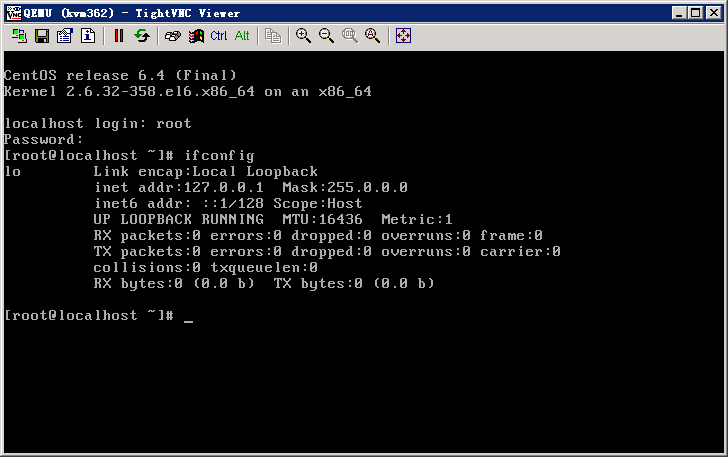
Linux network no find eth0
适用于:
1:Red Hat Linux
2:CentOS
#/etc/sysconfig/network-scripts
#vi ifcfg-eth0
#将ONBOOT=no,设置为ONBOOT=yes。
#service network restart