VPS 重启后自动发送邮件

VPS 重启后自动发送邮件
1:yum -y install sendmail
2:检测是否能正常发送邮件 SMTP
netstat -ant (查看是否开放25号端口)
3:touch 1.sh
vi 1.sh
管理员邮箱root@zhangfangzhou.cn
---------------------------------
#!/bin/sh
sendmail -t >/dev/null 2>&1 <<EOF
to:admin@qq.com
from:root@seafile.com
subject:Your server is restarted.

Your server is restarted.
$(ifconfig eth0 |awk '/inet addr/{gsub(/addr:/,"");print $2}')
$(date +%Y/%m/%d/%H:%M:%S-%A)
EOF
---------------------------------
获取IP地址
#ifconfig 查看网卡编号(eth0,venet0:0) (文件位置:/etc/sysconfig/network-scripts)
#ls /etc/sysconfig/network-scripts
ifcfg-lo
ifcfg-venet0
ifcfg-venet0:0
ifcfg-venet0:1

#ifconfig eth0 |awk '/inet addr/{gsub(/addr:/,"");print $2}'
eth0: error fetching interface information: Device not found
#ifconfig venet0:0 |awk '/inet addr/{gsub(/addr:/,"");print $2}'
107.181.152.32

4:chmod 777 1.sh
5:vi /etc/rc.local #自启动项
6:添加/root/1.sh

VMware KVM

VMware Workstation 10 包含一个名为 VMware KVM 的新的可执行文件(目前仅适用于 Windows)。
从命令行运行 vmware-kvm.exe vmx-file.vmx后,您的虚拟机将以全屏模式启动,而且不会显示工具栏或其他指示您在运行虚拟机的指示。
您可以使用 Ctrl-Alt 取消对虚拟机的抓取,同时使用 Pause/Break 键在运行于 VMware KVM 下的多个虚拟机之间或者在虚拟机与主机系统之间切换。
用户就好像在使用 KVM 交换机。

D:\Vmware>vmware-kvm.exe D:\Windows\CentOS\CentOS.vmx
D:\Vmware>vmware-kvm.exe "D:\Windows\CentOS 64\CentOS 64.vmx"

(这是最新一代的可执行文件,之前称为 VMware-fullscreen.exe)

VMware KVM (1)

VMware KVM (2)

VMware KVM (3)

VMware KVM (4)

DNS根服务器 (root server dns)

http://www.root-servers.org/

a.root-servers.net     198.41.0.4   USA
b.root-servers.net     192.228.79.201 
c.root-servers.net     192.33.4.12
d.root-servers.net     199.7.91.13
e.root-servers.net     192.203.230.10
f.root-servers.net     192.5.5.241
g.root-servers.net     192.112.36.4
h.root-servers.net     128.63.2.53
i.root-servers.net     192.36.148.17
j.root-servers.net     192.58.128.30
k.root-servers.net     193.0.14.129
l.root-servers.net     199.7.83.42
m.root-servers.net     202.12.27.33

root server dns

Change Hostname in CentOS 6.5/7

Change Hostname in CentOS 6.5/7

CentOS 6.5

[1] Change hostname with a commnad (but if rebooting, it will be back).

[root@vpsmate ~]# hostname              # show current hostname
srv1.vpsmate.net
[root@vpsmate ~]# hostname srv2.vpsmate.net         # change hostname
[root@vpsmate ~]# hostname
srv2.vpsmate.net
[2] Change hostname permanently.

[root@vpsmate ~]# vi /etc/sysconfig/network     # change
HOSTNAME=srv2.vpsmate.net
[root@vpsmate ~]# exit
CentOS release 6.5
Kernel xxx
srv2.vpsmate.net login:                 # changed

CentOS 7

[1]Change hostname with a commnad (but if rebooting, it will be back).

[root@vpsmate ~]# hostname                  # show current hostname
srv1.vpsmate.net
[root@vpsmate ~]# hostname srv2.vpsmate.net         # change hostname
[root@vpsmate ~]# hostname
srv2.vpsmate.net
[2] Change hostname permanently.

view source
[root@vpsmate ~]# vi /etc/hostname          # change
srv1.vpsmate.net
[root@vpsmate ~]# exit
CentOS Linux 7
Kernel 3.10.0-123.4.2.el7.x86_64 on an x86_64
srv1 login:                         # just changed
 

DNS服务器

DNS(Domain Name System,域名系统),DNS协议运行在UDP协议之上,使用端口号53。
DNS服务器(国内)
1、阿里DNS
http://www.alidns.com/
223.5.5.5 
223.6.6.6
2、114DNS
http://www.114dns.com/
114.114.114.114 
114.114.115.115
3、OpenerDNS
https://code.google.com/p/openerdns/
42.120.21.30
4、ONEDNS
http://www.onedns.net/
112.124.47.27
DNS服务器(国际)
1、Google Public DNS
https://developers.google.com/speed/public-dns/
8.8.8.8
8.8.4.4
2、OpenDNS
http://www.opendns.com/
208.67.222.222
208.67.220.220

server

CentOS 多网卡配置,网卡重命名

CentOS 多网卡配置
1:添加一块或多块网卡     
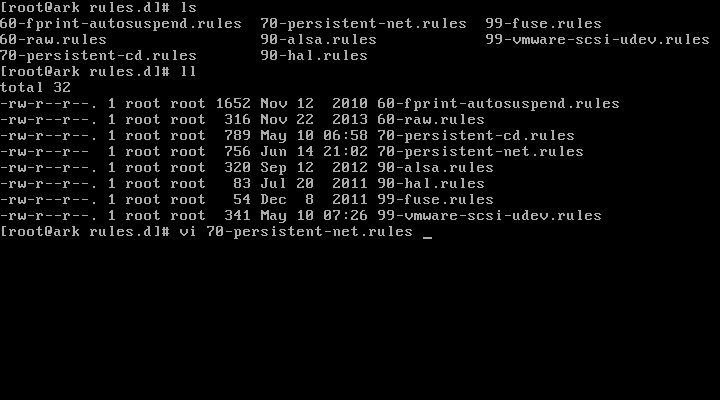
2:cd /etc/udev/rules.d/
3:cat 70-persistent-net.rules  #查看网卡的名称 NAME="eth1",并记录MAC等信息。
4:cd /etc/sysconfig/network-scripts
5:cp ifcfg-eth0 ifcfg-eth1
6:vi ifcfg-eth1
7:修改DEVICE=eth0 ,修改HWADDR
8:nmcli con  查看网卡UUID,并修改原来的,或者注释掉UUID  (#UUID)
9:reboot


CentOS 网卡重命名
eth0 rename4

1:cd /etc/sysconfig/network-scripts
2:vi ifcfg-eth1
3:修改DEVICE=eth1
4:cd /etc/udev/rules.d/
5:70-persistent-net.rules  #存储网卡标识
6:vi 70-persistent-net.rules  #编辑
7:reboot

CentOS ETH (1)

CentOS ETH (2)

CentOS ETH (3)

CentOS ETH (4)

在CMD中查询Whois

在CMD中查询Whois
介绍:http://technet.microsoft.com/en-us/Sysinternals/bb897435.aspx
下载1:http://download.sysinternals.com/files/WhoIs.zip
下载2:http://download.sysinternals.com/files/SysinternalsSuite.zip

1:下载解压后,将解压出来的whois.exe放置到 C:/Windows/system32/ 目录下。
2:打开CMD命令行,输入:whois xxx.com 即可查询。
3:也可以放置到其他目录下,使用的时候在CMD命令行下进入该目录。
4:输入:whois xxx.com 即可查询。

whois