CentOS 6、CentOS 7 ,使用crontab和logrotate实现Nginx日志轮询(转存)

CentOS 6、CentOS 7 ,使用crontab和logrotate实现Nginx日志轮询(转存)

1、安装crontab
2、安装logrotate日志文件管理工具
3、分析cron.daily
4、Nginx日志轮询(转存)配置,Apache的类似
5、为什么日志轮询(转存)生成日志的时间是凌晨三四点
6、立即执行logratate
7、logratate常用配置参数

1、安装crontab
if ! which crond >/dev/null 2>&1;then yum install cronie -y; fi
systemctl enable crond

2、 安装logrotate日志文件管理工具
yum -y install logrotate
查看logrotate的软件包的信息
rpm -ql logrotate
/etc/cron.daily/logrotate
/etc/logrotate.conf
/etc/logrotate.d
.....
.....

3、分析cron.daily
cd /etc/cron.daily
[root@www.zhangfangzhou.cn cron.daily]# ls
logrotate makewhatis.cron
[root@www.zhangfangzhou.cn cron.daily]# tail logrotate
#!/bin/sh

/usr/sbin/logrotate /etc/logrotate.conf
EXITVALUE=$?
if [ $EXITVALUE != 0 ]; then
/usr/bin/logger -t logrotate "ALERT exited abnormally with [$EXITVALUE]"
fi
exit 0

4、Nginx日志轮询(转存)配置,Apache日志轮询(转存)类似。
/home/wwwlogs/ 网站日志目录

cat > /etc/logrotate.d/nginx << EOF
/home/wwwlogs/*log {
daily
rotate 5
missingok
dateext
compress
notifempty
sharedscripts
postrotate
    [ -e /usr/local/nginx/logs/nginx.pid ] && kill -USR1 \`cat /usr/local/nginx/logs/nginx.pid\`
endscript
}
EOF

5、为什么日志轮询(转存)生成日志的时间是凌晨三四点?
Logrotate是基于CRON运行的,所以这个时间是由CRON控制的,具体可以查询CRON的配置文件「/etc/crontab」
anacron 正在运行过去 crontab 未进行的各项工作排程

cat /etc/anacrontab
# /etc/anacrontab: configuration file for anacron

# See anacron(8) and anacrontab(5) for details.

SHELL=/bin/sh
PATH=/sbin:/bin:/usr/sbin:/usr/bin
MAILTO=root
# the maximal random delay added to the base delay of the jobs
RANDOM_DELAY=45 #最大延迟时间
# the jobs will be started during the following hours only
START_HOURS_RANGE=3-22 #只在03到22点之间执行

#period in days delay in minutes job-identifier command
1 5 cron.daily nice run-parts /etc/cron.daily
7 25 cron.weekly nice run-parts /etc/cron.weekly
@monthly 45 cron.monthly nice run-parts /etc/cron.monthly

每天都执行/etc/cront.daily/目录下的脚本文件,
真实的延迟RANDOM_DELAY+delay。这里的延迟是5分钟,加上上面的RANDOM_DELAY,所以实际的延迟时间是5-50之间,开始时间为03-22点,
如果机器没关,那么一般就是在03:05-03:50之间执行。nice命令将该进程设置为nice=10,默认为0,即低优先级进程。
如果RANDOM_DELAY=0,那么表示准确延迟5min,即03:05执行cron.daily

6、立即执行logratate
ldconfig #执行
或者
/etc/cron.daily
logrotate
或者
执行下面
/usr/sbin/logrotate -f /etc/logrotate.d/nginx

由于logratate已经加到cron.daily(/etc/cron.daily/logrotate),不再需要加到计划任务中

7、logratate常用配置参数
/home/wwwlogs/*log:需要轮询日志路径
daily:每天轮询
rotate 5:保留最多5次滚动的日志
missingok:如果日志丢失,不报错继续滚动下一个日志
dateext:使用日期作为命名格式
compress:通过gzip压缩转储以后的日志
notifempty:当日志为空时不进行滚动
/usr/local/nginx/logs/nginx.pid: nginx pid位置,请查看nginx.conf
postrotate/endscript:在截断转储以后需要执行的命令

CentOS 7 可能出现如下问题
error: skipping "/home/wwwlogs/access_nginx.log" because parent directory has insecure permissions (It's world writable or writable by group which is not "root") Set "su" directive in config file to tell logrotate which user/group should be used for rotation.
解决方案
vi /etc/logrotate.d/nginx
su $http_user $http_group
su www www

CentOS7通过反向SSH隧道(Reverse SSH Tunneling) 实现内网穿透

CentOS7通过反向SSH隧道(Reverse SSH Tunneling) 实现内网穿透

1、By default, SSH daemon is only listening on 127.0.0.1, so we won’t be able to access to our forwarded ports from outside. To get it listen on the interface connected to Internet we must enable GatewayPorts option in SSH server's configuration.
默认情况下,SSH守护程序只侦听127.0.0.1,所以我们将无法从外部访问我们转发的端口。 要让它在连接到Internet的接口上侦听,我们必须在SSH服务器的配置中启用GatewayPorts选项。

vim /etc/ssh/sshd_config
然后GatewayPorts yes在文件的底部添加。
或者sed -i s/"#GatewayPorts no"/"GatewayPorts yes"/g /etc/ssh/sshd_config

2、为防止SSH登录自动超时,修改下面参数每60秒会发一个KeepAlive请求
vim /etc/ssh/sshd_config
修改server端的配置文件/etc/ssh/sshd_config

# server每隔60秒给客户端发送一次保活信息包给客户端
ClientAliveInterval 60

# server端发出的请求客户端没有回应的次数达到86400次的时候就断开连接,正常情况下客户端都会相应
ClientAliveCountMax 86400

sed -i s/"#ClientAliveInterval 0"/"ClientAliveInterval 60"/g /etc/ssh/sshd_config
sed -i s/"#ClientAliveCountMax 3"/"ClientAliveCountMax 86400"/g /etc/ssh/sshd_config

3、ssh -fNR 公网服务器需要监听的端口:localhost:内网需要监听的端口 用户@公网服务器
-N:不执行何指令
-f:后台执行
-R:建立reverse tunnel

在内网服务器上执行,那么就可以通过公网服务器的1688端口来连接处于多层内网的服务器了
ssh -fNR 1688:localhost:22 root@122.114.224.224 -p 12345

公网服务器执行netstat -tulpn
tcp 0 0 0.0.0.0:1688 0.0.0.0:* LISTEN 2442/sshd

4、也可以用 autossh 来创建一个连接到公网服务器的永久 SSH 隧道。

5、Windows 通过隧道实现内网穿透
plink -R [Port to forward to on your VPS]:localhost:[Port to forward on your local machine] [VPS IP]
http://www.chiark.greenend.org.uk/~sgtatham/putty/latest.html

6、这里是用CentOS7,当然也可以使用Ubuntu、Debian、Fedora等等

ssh -fNR 公网服务器需要监听的端口:localhost:内网需要监听的端口 用户@公网服务器

#本地22端口映射到服务器上面的1688端口
ssh -fN -R 122.114.224.224:1688:localhost:22 root@122.114.224.224 -p 12345

#本地80端口映射到服务器上面的18888端口,localhost 可以换成本地IP地址,或者局域网中的其他IP地址
ssh -fN -R 18888:localhost:80 root@122.114.224.224 -p 12345

#局域网中的远程桌面映射到服务器的3389端口
ssh -fN -R 3389:192.168.0.183:3389 root@122.114.224.224 -p 12345

#本地22端口映射到服务器上面的1688端口并打印调试信息
ssh -fN -R 122.114.224.224:1688:localhost:22 root@122.114.224.224 -p 12345 -v

CentOS实现Nginx1.10.3平滑升级Nginx1.11.10(热部署或热加载)

CentOS实现Nginx1.10.3平滑升级Nginx1.11.10(热部署或热加载)
如果要对当前的Nginx服务器进行版本升级,应用新模块,如果用户访问量比较大的时候,如果需要在不影响客户的情况下进行升级的话,这时候就得考虑平滑升级了。
平缓停止Nginx服务
平缓重启Nginx服务

创建用户目录和赋予权限
id -u www >/dev/null 2>&1
[ $? -ne 0 ] && useradd -M -s /sbin/nologin www;
mkdir -p /usr/local/nginx && chown www.www -R /usr/local/nginx;

yum -y install gcc make screen python wget git pcre-devel zlib-devel openssl-devel

CentOS源码编译安装Nginx1.10.3
wget http://nginx.org/download/nginx-1.10.3.tar.gz
tar -zxvf nginx-1.10.3.tar.gz;cd nginx-1.10.3
./configure --prefix=/usr/local/nginx --user=www --group=www \
--with-http_stub_status_module \
--with-http_secure_link_module \
--with-http_v2_module \
--with-http_ssl_module \
--with-ipv6 \
--with-http_gzip_static_module \
--with-http_realip_module \
--with-http_flv_module \
--with-http_mp4_module \
--with-http_sub_module \
--with-stream \
--with-stream_ssl_module
make
make install

CentOS源码编译Nginx1.11.10
wget http://nginx.org/download/nginx-1.11.10.tar.gz
tar -zxvf nginx-1.11.10.tar.gz;cd nginx-1.11.10
./configure --prefix=/usr/local/nginx --user=www --group=www \
--with-http_stub_status_module \
--with-http_secure_link_module \
--with-http_v2_module \
--with-http_ssl_module \
--with-ipv6 \
--with-http_gzip_static_module \
--with-http_realip_module \
--with-http_flv_module \
--with-http_mp4_module \
--with-http_sub_module \
--with-stream \
--with-stream_ssl_module
make

1、重命名低版本的nginx
# mv /usr/local/nginx/sbin/nginx /usr/local/nginx/sbin/nginx.old

2、然后拷贝一份新编译的二进制文件:
[root@www.zhangfangzhou.cn nginx-1.11.10]# cp objs/nginx /usr/local/nginx/sbin/

3、在源码目录执行make upgrade开始升级,因为nginx.pid的位置,造成自动升级会报错误
[root@www.zhangfangzhou.cn nginx-1.11.10] # make upgrade

[root@www.zhangfangzhou.cn nginx-1.11.10]# cat Makefile

default: build

clean:
rm -rf Makefile objs

build:
$(MAKE) -f objs/Makefile

install:
$(MAKE) -f objs/Makefile install

modules:
$(MAKE) -f objs/Makefile modules

upgrade:
/usr/local/nginx/sbin/nginx -t

kill -USR2 `cat /usr/local/nginx/logs/nginx.pid`
sleep 1
test -f /usr/local/nginx/logs/nginx.pid.oldbin

kill -QUIT `cat /usr/local/nginx/logs/nginx.pid.oldbin`

#下面是手动升级
[root@www.zhangfangzhou.cn nginx-1.11.10]# kill -USR2 `cat /var/run/nginx.pid;`
[root@www.zhangfangzhou.cn nginx-1.11.10]# sleep 1
[root@www.zhangfangzhou.cn nginx-1.11.10]# test -f /usr/local/nginx/logs/nginx.pid.oldbin
[root@www.zhangfangzhou.cn nginx-1.11.10]# kill -QUIT `cat /var/run/nginx.pid.oldbin`

平缓升级Nginx服务:使用新版本的Nginx文件启动服务,之后平缓停止原有的Nginx进程
# kill -USR2 `cat /nginx/logs/nginx.pid`

平缓停止Nginx服务:平缓停止是指允许Nginx服务将当前正在处理的网络请求处理完成,但不再接受新的请求,之后关闭连接,停止工作
# kill -QUIT `cat /nginx/logs/nginx.pid`

平缓重启Nginx服务:Nginx服务进程接受到信号后,首先读取新的Nginx配置文件,如果配置语法正确,则启动新的Nginx服务,然后平缓关闭旧的服务进程,如果新的Nginx配置文件有问题,将显示错误,仍然使用旧的Nginx进程提供服务
# kill -HUP `cat /nginx/logs/nginx.pid`

Linux CentOS 7 多网卡配置bond模式 bond1 bond5 bond6

https://access.redhat.com/documentation/en-US/Red_Hat_Enterprise_Linux/7/html/Networking_Guide/sec-Network_Bonding_Using_the_Command_Line_Interface.html

Linux CentOS 7 多网卡配置bond模式 bond1 bond5 bond6

网卡绑定mode共有七种(0~6) bond0、bond1、bond2、bond3、bond4、bond5、bond6
常用的有四种
mode=0:(balance-rr) Round-robin policy(平衡抡循环策略)平衡负载模式,有自动备援,但需要”Switch”支援及设定。
mode=1,(active-backup) Active-backup policy(主-备份策略)只有一个设备处于活动状态,当一个宕掉另一个马上由备份转换为主设备。mac地址是外部可见得,从外面看来,bond的MAC地址是唯一的。
mode=5,(balance-tlb) Adaptive transmit load balancing(适配器传输负载均衡)不需要任何特别的switch(交换机)支持的通道bonding。
mode=6,(balance-alb) Adaptive load balancing(适配器适应性负载均衡)该模式包含了balance-tlb模式,同时加上针对IPV4流量的接收负载均衡(receive load balance, rlb),而且不需要任何switch(交换机)的支持。接收负载均衡是通过ARP协商实现的

mode=1,(active-backup) Active-backup policy(主-备份策略)

在Centos 7中,我们可以使用modinfo bonding 命令查看bonding模块的信息,默认情况下bonding模块没有被加载

以root用户登录,输入如下的命令进行开启加载bonding模块
modprobe --first-time bonding //--first-time Fail if module already inserted or removed

cat /etc/sysconfig/network-scripts/ifcfg-bond1
DEVICE=bond1
BONDING_OPTS="resend_igmp=1 updelay=0 use_carrier=1 miimon=100 downdelay=0 xmit_hash_policy=0 primary_reselect=0 fail_over_mac=0 arp_validate=0 mode=active-backup primary=eno16777736 arp_interval=0 ad_select=0"
TYPE=Bond
BONDING_MASTER=yes
BOOTPROTO=none
IPADDR=192.168.199.235
PREFIX=24
DEFROUTE=yes
PEERDNS=yes
PEERROUTES=yes
IPV4_FAILURE_FATAL=no
IPV6INIT=yes
IPV6_AUTOCONF=yes
IPV6_DEFROUTE=yes
IPV6_PEERDNS=yes
IPV6_PEERROUTES=yes
IPV6_FAILURE_FATAL=no
NAME="Bond connection 1"
UUID=e110d205-848e-4527-8cb1-2b3ac76cfb9b
ONBOOT=yes

cat /etc/sysconfig/network-scripts/ifcfg-eno33554960
HWADDR=00:0C:29:1B:57:14
TYPE=Ethernet
BOOTPROTO=none 修改
DEFROUTE=yes
PEERDNS=yes
PEERROUTES=yes
IPV4_FAILURE_FATAL=no
IPV6INIT=yes
IPV6_AUTOCONF=yes
IPV6_DEFROUTE=yes
IPV6_PEERDNS=yes
IPV6_PEERROUTES=yes
IPV6_FAILURE_FATAL=no
NAME=eno33554960
UUID=ef35e777-0bc3-4afa-ad54-490e1543242a
ONBOOT=yes 修改

[root@www.zhangfangzhou.cn ~]# cat /proc/net/bonding/bond1
Ethernet Channel Bonding Driver: v3.7.1 (April 27, 2011)

Bonding Mode: fault-tolerance (active-backup)
Primary Slave: eno16777736 (primary_reselect always)
Currently Active Slave: eno16777736
MII Status: up
MII Polling Interval (ms): 0
Up Delay (ms): 0
Down Delay (ms): 0

Slave Interface: eno16777736
MII Status: up
Speed: 1000 Mbps
Duplex: full
Link Failure Count: 0
Permanent HW addr: 00:0c:29:1b:57:0a
Slave queue ID: 0

Slave Interface: eno33554960
MII Status: up
Speed: 1000 Mbps
Duplex: full
Link Failure Count: 0
Permanent HW addr: 00:0c:29:1b:57:14
Slave queue ID: 0

Slave Interface: eno50332184
MII Status: up
Speed: 1000 Mbps
Duplex: full
Link Failure Count: 0
Permanent HW addr: 00:0c:29:1b:57:1e
Slave queue ID: 0

Slave Interface: eno67109408
MII Status: up
Speed: 1000 Mbps
Duplex: full
Link Failure Count: 0
Permanent HW addr: 00:0c:29:1b:57:28
Slave queue ID: 0
------------------------------------------------------------------------------------------------------------------------
CentOS7手动配置bond6(balance-alb) Adaptive load balancing(适配器适应性负载均衡)

1、在Centos 7中,我们可以使用modinfo bonding 命令查看bonding模块的信息,默认情况下bonding模块没有被加载

以root用户登录,输入如下的命令进行开启加载bonding模块
modprobe --first-time bonding //--first-time Fail if module already inserted or removed

2、创建bond0配置文件,创建/etc/sysconfig/network-scripts/ifcfg-bond0文件,加入如下内容
cat /etc/sysconfig/network-scripts/ifcfg-bond0

DEVICE=bond0
TYPE=Bond
BONDING_MASTER=yes
BOOTPROTO=none
DEFROUTE=yes
IPV4_FAILURE_FATAL=no
IPV6INIT=yes
IPV6_AUTOCONF=yes
IPV6_DEFROUTE=yes
IPV6_FAILURE_FATAL=no
NAME="bond0"
IPADDR=192.168.199.223
PREFIX=24
ONBOOT=yes
BONDING_OPTS="resend_igmp=1 updelay=0 use_carrier=1 miimon=100 downdelay=0 xmit_hash_policy=0 primary_reselect=0 fail_over_mac=0 arp_validate=0 mode=balance-alb arp_interval=0 ad_select=0"
PEERDNS=yes
PEERROUTES=yes
IPV6_PEERDNS=yes
IPV6_PEERROUTES=yes

其中BONDING_OPTS指定bonding的模式,其中10.101.230.30/27将作为bond0的ip地址

3、配置e网卡配置文件,文件位于/etc/sysconfig/network-scripts/目录

vi ifcfg-eno16777736

TYPE=Ethernet
BOOTPROTO=none 修改
DEFROUTE=yes
PEERDNS=yes
PEERROUTES=yes
IPV4_FAILURE_FATAL=no
IPV6INIT=yes
IPV6_AUTOCONF=yes
IPV6_DEFROUTE=yes
IPV6_PEERDNS=yes
IPV6_PEERROUTES=yes
IPV6_FAILURE_FATAL=no
NAME=eno1
UUID=26ea0bd1-0837-4b1a-9039-f147abd19632
DEVICE=eno16777736
ONBOOT=yes 修改
#以下两项为新增配置选项
MASTER=bond0
SLAVE=yes

systemctl restart network.service //重启网络服务

[root@www.zhangfangzhou.cn~]# cat /proc/net/bonding/bond0
Ethernet Channel Bonding Driver: v3.7.1 (April 27, 2011)

Bonding Mode: adaptive load balancing
Primary Slave: None
Currently Active Slave: eno33554960
MII Status: up
MII Polling Interval (ms): 100
Up Delay (ms): 0
Down Delay (ms): 0

Slave Interface: eno16777736
MII Status: up
Speed: 1000 Mbps
Duplex: full
Link Failure Count: 1
Permanent HW addr: 00:0c:29:1b:57:0a
Slave queue ID: 0

Slave Interface: eno33554960
MII Status: up
Speed: 1000 Mbps
Duplex: full
Link Failure Count: 0
Permanent HW addr: 00:0c:29:1b:57:14
Slave queue ID: 0

Slave Interface: eno50332184
MII Status: up
Speed: 1000 Mbps
Duplex: full
Link Failure Count: 0
Permanent HW addr: 00:0c:29:1b:57:1e
Slave queue ID: 0

Slave Interface: eno67109408
MII Status: up
Speed: 1000 Mbps
Duplex: full
Link Failure Count: 0
Permanent HW addr: 00:0c:29:1b:57:28
Slave queue ID: 0

------------------------------------------------------------
nutui配置bond6 (balance-alb) Adaptive load balancing(适配器适应性负载均衡)
https://access.redhat.com/documentation/en-US/Red_Hat_Enterprise_Linux/7/html/Networking_Guide/sec-Configure_Bonding_Using_the_Text_User_Interface_nmtui.html

[root@www.zhangfangzhou.cn network-scripts]# cat ifcfg-Bond_connection_1
DEVICE=bond0
TYPE=Bond
BONDING_MASTER=yes
BOOTPROTO=dhcp
DEFROUTE=yes
IPV4_FAILURE_FATAL=no
IPV6INIT=yes
IPV6_AUTOCONF=yes
IPV6_DEFROUTE=yes
IPV6_FAILURE_FATAL=no
NAME="Bond connection 1"
UUID=5aa07976-3cc3-4db2-b9a8-af598906d263
ONBOOT=yes
BONDING_OPTS="resend_igmp=1 updelay=0 use_carrier=1 miimon=100 downdelay=0 xmit_hash_policy=0 primary_reselect=0 fail_over_mac=0 arp_validate=0 mode=balance-alb arp_interval=0 ad_select=0"
PEERDNS=yes
PEERROUTES=yes
IPV6_PEERDNS=yes
IPV6_PEERROUTES=yes

[root@www.zhangfangzhou.cn network-scripts]# cat ifcfg-eno16777736
HWADDR=00:0C:29:00:50:D4
TYPE=Ethernet
BOOTPROTO=dhcp
DEFROUTE=yes
PEERDNS=yes
PEERROUTES=yes
IPV4_FAILURE_FATAL=no
IPV6INIT=yes
IPV6_AUTOCONF=yes
IPV6_DEFROUTE=yes
IPV6_PEERDNS=yes
IPV6_PEERROUTES=yes
IPV6_FAILURE_FATAL=no
NAME=eno16777736
UUID=600f243a-ef20-4b91-8e5c-02a21b49cfb3
ONBOOT=no

[root@www.zhangfangzhou.cn network-scripts]# cat ifcfg-Ethernet_connection_1
TYPE=Ethernet
NAME="Ethernet connection 1"
UUID=a7f3051a-0aac-45fd-a019-75b9db495736
DEVICE=eno16777736
ONBOOT=yes
MASTER=5aa07976-3cc3-4db2-b9a8-af598906d263
SLAVE=yes

------------------------------------------------------------------------------------------------------------------------
配置mode=5,(balance-tlb) Adaptive transmit load balancing(适配器传输负载均衡)
cat /etc/sysconfig/network-scripts/ifcfg-bond5

bond5
DEVICE=bond5
TYPE=Bond
NAME=bond5
BONDING_MASTER=yes
BOOTPROTO=none
ONBOOT=yes
IPADDR=10.216.13.3
NETMASK=255.255.255.0
BONDING_OPTS="resend_igmp=1 updelay=0 use_carrier=1 miimon=100 downdelay=0 xmit_hash_policy=0 primary_reselect=0 fail_over_mac=0 arp_validate=0 mode=balance-tlb arp_interval=0 ad_select=0"

Linux CentOS6 挂载使用 Windows Server 2012 R2 的 WebDAV

Linux CentOS6 挂载使用 Windows Server 2012 R2 的 WebDAV
CentOS6 挂载使用 Windows Server 2012 R2 的 WebDAV
Windows Server 2012 R2 安装 WebDAV
http://www.ibm.com/support/knowledgecenter/SSEP7J_10.2.1/com.ibm.swg.ba.cognos.c8pp_inst.10.2.1.doc/t_enablewebdavoniis.html
https://www.iis.net/configreference/system.webserver/webdav
https://www.iis.net/learn/install/installing-publishing-technologies/installing-and-configuring-webdav-on-iis


yum -y install gcc gcc-c++ wget openssl-devel
wget -c http://www.webdav.org/neon/neon-0.30.2.tar.gz #neon is an HTTP and WebDAV client library, with a C interface. Features:
tar zxf neon-0.30.2.tar.gz
cd neon-0.30.2
./configure --with-ssl
make && make install
wget -c http://download.savannah.gnu.org/releases/davfs2/davfs2-1.5.0.tar.gz
#http://download-mirror.savannah.gnu.org/releases/davfs2/davfs2-1.5.4.tar.gz 更高的版本需要gcc4.9
tar zxf davfs2-1.5.0.tar.gz
cd davfs2-1.5.0
./configure
make && make install
useradd davfs2

yum -y install davfs2
mkdir /root/www.zhangfangzhou.cn
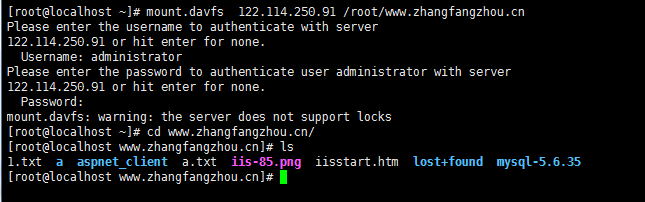
mount.davfs 122.114.250.255 /root/www.zhangfangzhou.cn

可以调整一下参数做系统自动挂载,免去每次手动操作。
第一步:使用sed命令修改系统设置
sed -i 's/# use_locks 1/use_locks 0/g' /etc/davfs2/davfs2.conf

第二步:将WebDAV发布地址以及账号密码写入配置文件
echo "122.114.250.255 账户 密码" > /etc/davfs2/secrets

第三步:加入系统自动启动
echo "mount.davfs 122.114.250.255 /root/www.zhangfangzhou.cn" >> /etc/rc.local
最后reboot系统测试一下吧。

CentOS 7安装GNOME桌面 和 配置 VNC 服务器

CentOS 7安装GNOME桌面 和 配置 VNC 服务器
这是一个关于怎样在你的 CentOS 7 上安装GNOME桌面 和 配置 VNC 服务器的教程。当然这个教程也适合 RHEL 7 安装GNOME桌面 和 配置 VNC 服务器。

1、安装桌面
yum check-update
yum groupinstall "X Window System" "GNOME Desktop" -y

2、设置默认启动图形界面
unlink /etc/systemd/system/default.target
ln -sf /lib/systemd/system/graphical.target /etc/systemd/system/default.target

3、安装 VNC 服务器
yum install tigervnc-server -y

然后,我们需要在 /etc/systemd/system/ 目录里创建一个配置文件。我们可以将 /lib/systemd/sytem/vncserver@.service 拷贝一份配置文件范例过来。

cp /lib/systemd/system/vncserver@.service /etc/systemd/system/vncserver@:1.service

4、配置VNC服务器
vi /etc/systemd/system/vncserver@:1.service
然后打开这个配置文件/etc/systemd/system/vncserver@:1.service替换掉默认用户名
找到这一行
ExecStart=/sbin/runuser -l -c "/usr/bin/vncserver %i"
PIDFile=/home//.vnc/%H%i.pid
这里我直接用root 用户登录,所以我替换成
ExecStart=/sbin/runuser -l root -c "/usr/bin/vncserver %i"
PIDFile=/root/.vnc/%H%i.pid

5、重加载 systemd
# systemctl daemon-reload

6、VNC设密码
# vncpasswd

7、配置防火墙iptables或者firewalld
vim /etc/sysconfig/iptables
在合适位置加上
-A INPUT -m state --state NEW -m tcp -p tcp --dport 5900:5903 -j ACCEPT
重启iptable
service iptables restart

如果是用Centos 7 默认防火墙的可能需要
# firewall-cmd --permanent --add-service vnc-server
# systemctl restart firewalld.service

8、设默认启动并开启VNC
# systemctl enable vncserver@:1.service
# systemctl start vncserver@:1.service

9、重新启动服务器
reboot

安装 node.js使用Google WebFont Downloader 解决谷歌字体无法访问

node-js
使用Google WebFont Downloader 解决谷歌字体无法访问
本地化Google字体

1、安装 Google WebFont Downloader 工具
CentOS 6 安装 node.js

NodeJS 7.x

NOTE: If you are using RHEL 6 or CentOS 6, you might want to read about running Node.js >= 4.x on older distros.
curl -sL https://rpm.nodesource.com/setup_7.x | bash -

NodeJS 6.x

NOTE: If you are using RHEL 6 or CentOS 6, you might want to read about running Node.js >= 4.x on older distros.
curl -sL https://rpm.nodesource.com/setup_6.x | bash -

其他版本https://github.com/nodesource/distributions

yum install nodejs -y
npm install -g goog-webfont-dl

2、下载字体

例如 "http://fonts.googleapis.com/css?family=Source+Sans+Pro:300,400,600,900"

goog-webfont-dl -a -f 'Source Sans Pro' -y '300,400,600,900'

这样字体就已经下载完成了,不仅生成了一个 Source Sans Pro 的目录,所有字体文件都在里面(包括 ttf eot woff woff2 svg),而且还在外面生成了一个 Source Sans Pro.css 文件。
不过 CSS 中的路径需要根据自己的需要修改一下。

3、使用字体
将字体文件复制到自己想要的目录,然后修改一下 CSS 文件将字体路径设置正确,就可以使用本地的字体。

4、修改使用字体的地方
WordPress主要是修改这两个地方
wp-content/themes/patus/functions.php
wp-includes/script-loader.php

CentOS6安装devtoolset(使用高版本gcc)GCC 4.8 GCC 4.9 GCC 5.2

CentOS6安装devtoolset(使用高版本gcc)GCC 4.8 GCC 4.9 GCC 5.2
Aria2要求gcc 4.8以上的版本才能编译,然而CentOS6源里的gcc版本才4.4

gcc_logo

GCC 4.8

wget http://people.centos.org/tru/devtools-2/devtools-2.repo -O /etc/yum.repos.d/devtools-2.repo

yum install devtoolset-2-gcc devtoolset-2-binutils devtoolset-2-gcc-c++ -y

临时编译前使用
export CC=/opt/rh/devtoolset-2/root/usr/bin/gcc
export CPP=/opt/rh/devtoolset-2/root/usr/bin/cpp
export CXX=/opt/rh/devtoolset-2/root/usr/bin/c++

以下为替换系统GCC,不建议这样操作
ln -s /opt/rh/devtoolset-2/root/usr/bin/* /usr/local/bin/
hash -r
gcc --version


GCC 4.9
wget https://copr.fedoraproject.org/coprs/rhscl/devtoolset-3/repo/epel-6/rhscl-devtoolset-3-epel-6.repo -O /etc/yum.repos.d/devtools-3.repo
yum install devtoolset-3-gcc devtoolset-3-binutils devtoolset-3-gcc-c++ -y

临时编译前使用
export CC=/opt/rh/devtoolset-3/root/usr/bin/gcc
export CPP=/opt/rh/devtoolset-3/root/usr/bin/cpp
export CXX=/opt/rh/devtoolset-3/root/usr/bin/c++


GCC 5.2
wget https://copr.fedoraproject.org/coprs/hhorak/devtoolset-4-rebuild-bootstrap/repo/epel-6/hhorak-devtoolset-4-rebuild-bootstrap-epel-6.repo -O /etc/yum.repos.d/devtools-4.repo
yum install devtoolset-4-gcc devtoolset-4-binutils devtoolset-4-gcc-c++ -y

临时编译前使用
export CC=/opt/rh/devtoolset-4/root/usr/bin/gcc
export CPP=/opt/rh/devtoolset-4/root/usr/bin/cpp
export CXX=/opt/rh/devtoolset-4/root/usr/bin/c++